
Table of Contents
ToggleGoogle Search Console Just Started Tracking Your Instagram and TikTok Posts on Google Search
If you post on Instagram, TikTok, X, or YouTube and have no idea whether Google Search is sending you any traffic, that gap just closed.
On July 7, 2026, Google rolled out a new Search Console feature called platform properties. It lets creators and brands see exactly how their social and video posts show up in Google Search and Google Discover, down to the specific query that brought someone to a specific post.
This matters because most creators have been flying blind. You could see likes and shares on TikTok, watch time on YouTube, and impressions on X, but none of those platforms tell you if someone found your content through a Google search. Now Search Console does.
Here’s everything you need to know: what platform properties actually track, who can use them right now, how to set one up, and what this shift means for anyone doing SEO in 2026.
What Are Platform Properties in Google Search Console?
A platform property is a new type of Search Console property built specifically for content that lives on social and video platforms instead of your own website.
Until now, Search Console only worked for domains and URL-prefix properties, meaning you needed a website to get any data at all. A TikTok-only creator with no blog or website had no way to check their Search visibility.
Platform properties fix that gap directly. Google confirmed the launch on the Search Central blog, describing it as a way to give creators “a consolidated view of how all of their content is getting discovered on Search.”
Four platforms are supported at launch:
- TikTok
- X
- YouTube
You verify ownership of your account, and Search Console starts building a report around that specific channel, separate from any website property you might already own.
Why Google Built This Now
Search behavior has shifted. People increasingly want firsthand accounts and real video demonstrations instead of polished blog posts, and Google’s ranking systems have followed that shift by surfacing more social and short-video content directly in Search and Discover results.
Google had already tested this idea. An earlier experiment in December 2025 gave a small group of creators early access to social channel reporting inside Search Console. Platform properties are the full public rollout of that experiment, expanded to four major platforms.
For an SEO professional, the signal here is bigger than the feature itself. Google is treating off-site social content as a first-class citizen in its Search ecosystem, not an afterthought. If your content strategy still starts and ends with a website, you’re now missing half the picture Google is willing to show you for free.
What Data You Can Actually See
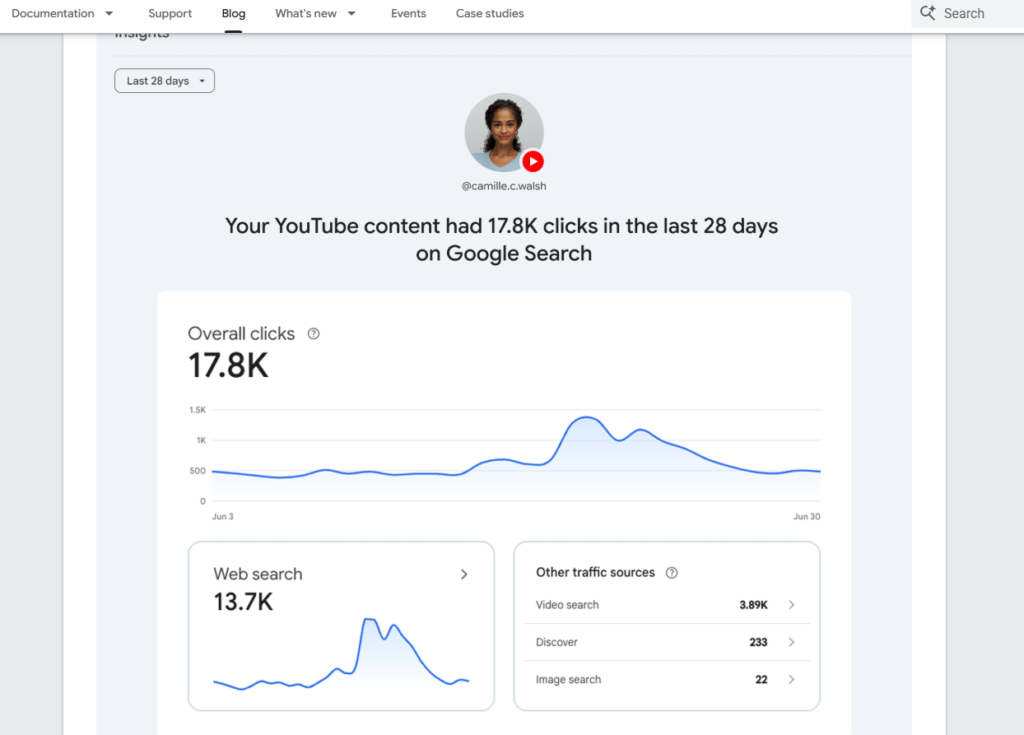
Platform properties come with three report types, and each one answers a different question.
Performance Report
This is the core report, and it will feel familiar if you’ve used Search Console for a website. It shows total clicks, impressions, and related metrics for your platform content on Search.
You can filter and sort by individual post and by search query, so you can answer questions like: which of my last 20 Reels actually got found through Google search, and what did people type to find it?
If you’d rather crunch the numbers in your own spreadsheet or BI tool, Google also supports exporting this data directly.
Insights Report
The Insights report gives you the shortcut version: a high-level summary of recent traffic trends, your top-performing posts, and how people are discovering your account through Google.
This is the report to check first if you just want a quick pulse check rather than a deep dive.
Achievements
Achievements track growth over time and flag milestones, like crossing a new threshold of total clicks from Google Search in a rolling 28-day window.
It’s a smaller feature, but it’s a useful nudge for creators who don’t check analytics dashboards often. A milestone notification is a reason to actually open the report.
[Suggested image: Side-by-side mockup of the Performance, Insights, and Achievements tabs inside a platform property]
How to Set Up a Platform Property (Step-by-Step)
Setting this up takes a few minutes if your account is eligible.
- Open Search Console.
- Go to the Search Console verification page, or click the property selector dropdown anywhere in Search Console and select “Add property.”
- Choose one of the four supported platforms: Instagram, TikTok, X, or YouTube.
- Follow the on-screen steps to verify and authorize the connection to your account.
Google has said the rollout is gradual, so if the option isn’t visible in your property selector yet, it’s likely a timing issue rather than something wrong on your end. Google’s own help center documentation is the place to check for the latest availability and setup details.
[Suggested screenshot: The four-platform selection screen during property setup]
What This Means If You Do SEO for a Living
A few practical shifts follow from this update, and they’re worth acting on rather than just reading about.
Track social content the same way you track pages. If a client or brand posts on TikTok and Instagram, those posts can now be measured against the same clicks-and-impressions standard as a landing page. Build platform properties into monthly reporting alongside your regular Search Console data, not as a separate afterthought.
Query-level data on social posts is new leverage. Seeing the exact search terms driving traffic to a specific video means you can reverse-engineer what topics and phrasing are working, then apply that language back into video titles, captions, and on-site content.
This doesn’t replace platform-native analytics. Instagram Insights, TikTok Analytics, and YouTube Studio still own engagement metrics like watch time, saves, and follower growth. Search Console’s platform properties only cover one thing: how content performs specifically on Google Search and Discover. Use both together.
Multi-platform creators finally get one lens. Someone posting the same core message across TikTok, X, and YouTube can now compare Search performance across all three from a single dashboard instead of guessing.
Frequently Asked Questions
Does Google Search Console track social media now?
Yes. As of the July 2026 update, Search Console supports platform properties for Instagram, TikTok, X, and YouTube, showing clicks, impressions, and query-level data for how that content performs on Google Search and Discover.
Do I need a website to use Search Console after this update?
No. Platform properties were built specifically for creators and accounts without their own website. You verify your social or video account directly instead of a domain.
Is this the same as Google Analytics?
No. Google Analytics measures on-site or in-app user behavior after someone lands on your content. Search Console’s platform properties measure something upstream of that: whether and how Google Search surfaces your content in the first place, and what queries led to it.
Which platforms work with the new Search Console feature?
Four platforms are supported at launch: Instagram, TikTok, X, and YouTube. Google has not announced additional platforms as of this writing.
How do I add my Instagram or TikTok account to Search Console?
Open Search Console, go to the property selector, click “Add property,” choose your platform, and complete the verification steps Google provides on screen. Full instructions are in Google’s help center article.
Is the rollout available to everyone right now?
Google has said platform properties are rolling out gradually over several weeks, so availability may vary by account.
The Bottom Line
Google Search Console now gives creators and brands a way to see how Instagram, TikTok, X, and YouTube content performs on Google Search, without needing a website at all. Set up a platform property for each account you manage, check the Performance and Insights reports weekly, and start feeding the query data back into your content and captions.
If you manage SEO for a brand with an active social presence, this is worth setting up this week, not next quarter. Query-level data on social content is genuinely new, and early movers will have a head start on understanding what’s already working.