
Table of Contents
ToggleWhy Google AdSense Approval Keeps Rejecting You (And How I Finally Got Approved)
Let me be real with you.
Getting Google AdSense approval feels like trying to crack a safe blindfolded. You submit your site, wait anxiously, and then rejection email. You fix things. Reapply. Rejected again. Sound familiar?
Yeah. I’ve been there. Twice, actually.
The crazy part is that most people getting rejected aren’t doing anything drastically wrong. They’re just missing a handful of specific things that Google’s review team is looking for things that nobody tells you clearly upfront. After years of working with WordPress site owners, digital marketers, and content beginners, I’ve seen the same patterns repeat over and over.
So in this guide, I’m going to break down exactly why you keep getting rejected, what the Google AdSense approval process actually looks like from the inside, how long Google AdSense takes to approve a website in 2026, and most importantly how to get AdSense approval fast the right way.
Let’s get into it.
Checkout The Below Blog For Adsense Aprroval
What the Google AdSense Approval Process Actually Looks Like
Before we talk about why you’re getting rejected, you need to understand what the AdSense approval process is and what Google’s reviewers are actually doing.
When you apply for AdSense, Google doesn’t just run an automated bot over your site and call it a day. There’s a two-stage review process:
Stage 1 — Automatic system check: Google’s algorithms scan your site for obvious policy violations, thin content, missing pages, and technical issues.
Stage 2 — Human review: Yes, actual people review your site against Google’s Publisher Policies and content guidelines.
This is important. A human reviewer is looking at your site and asking one core question: “Would I feel comfortable showing ads from major brands on this website?”
If the answer is even slightly uncertain, you get rejected.
Here’s the thing a lot of beginners don’t realize — the Google AdSense approval criteria aren’t just about your content. They’re about your entire website experience: navigation, trust signals, content quality, user intent, and even your about page.
How Long Does AdSense Take to Approve a Website?
This is probably the question I get asked the most. And honestly, the honest answer is: it varies wildly.
In 2026, the typical Google AdSense approval time for a new site is between 1 day and 2 weeks. Most people see a decision within 3–7 business days. But here’s what affects that timeline:
- Site age: Newer domains (under 3 months) get more scrutiny.
- Content volume: Sites with fewer than 15–20 solid posts take longer to evaluate.
- Niche sensitivity: Finance, health, and political content get slower, deeper reviews.
- Previous rejections: If you’ve been rejected before, reviewers tend to be more thorough on your next application.
- Traffic levels: A site with zero organic traffic from Google raises flags.
I’ve seen sites get approved in 24 hours. I’ve also seen sites wait 18 days. There’s no single magic number — but if you pass the two weeks mark without a response, you can follow up with Google’s support team.
The Real Reasons Google Keeps Rejecting Your AdSense Application
Okay. This is the section you actually came for. Let’s go through every major reason and I’m going to be honest when I’ve personally made some of these mistakes.
1. Your Content Is Too Thin or Copied
This is the number one reason. Hands down.
Google’s AdSense team directly states that sites must have “unique and relevant content.” They explicitly look for sites that don’t just copy content from other sources or produce low-value, keyword-stuffed posts.
I once helped a client who had a 40-page site — but every post was under 300 words and clearly auto-generated. Rejected three times. When we rewrote the top 15 posts to be genuinely helpful, detailed, and original, they got approved within five days of reapplication.
What counts as “thin” content? Posts under 400–500 words in most niches. Articles that just list facts without explanation. Content that reads like it was scraped or paraphrased from Wikipedia. Pages with big images and barely any text. Google calls these “doorway pages,” and they’re a quick path to rejection.
What to do: Aim for at least 800–1,500 words per post for your core content. Write from experience. Explain things. Make the reader feel like they learned something they couldn’t get anywhere else.
2. You’re Missing Essential Website Pages
Here’s something most guides skip entirely.
Google doesn’t just look at your blog posts. They check your site’s structure for trust signals. The AdSense review team wants to see that your site belongs to a legitimate person or organization and certain pages communicate that.
You need:
- About page — Who are you? Why does this site exist? A real About page with genuine information builds massive trust.
- Contact page — A working email address or contact form. It shows Google you’re reachable.
- Privacy Policy — This is non-negotiable because AdSense itself uses cookies and collects user data. You must disclose this per Google’s own privacy requirements.
- Terms and Conditions — Especially for sites that accept comments or user-generated content.
- Disclaimer (if applicable) — Especially for health, finance, or legal niches.
I’ve reviewed dozens of rejected AdSense sites, and missing the Privacy Policy alone has caused rejections. Google explicitly states in its publisher policies that publishers “must have and abide by a privacy policy that clearly discloses any data collection.” No privacy policy = no AdSense. It’s that simple.
3. Your Site Has Prohibited or Restricted Content
This one should be obvious, but you’d be surprised.
Google has a detailed list of content that’s completely off-limits for AdSense. This includes adult content, content promoting violence or hate, drug-related content, hacking tutorials, and more. But it also includes some gray areas people accidentally fall into:
- Health misinformation — Anti-vaccine content, unproven medical claims, or content that contradicts established scientific consensus.
- Misleading claims — “Get rich quick” schemes or content making unrealistic promises.
- Copyright infringement — Embedding unlicensed images, copying articles, or reproducing content without permission.
- Alcohol and gambling — These are restricted categories. Not banned outright, but they require additional review and often face stricter scrutiny.
One thing I see often with newer WordPress site owners: they use images from Google search without checking licensing. That’s a copyright issue, and it can absolutely cause rejection.
What to do: Use royalty-free images from Unsplash, Pexels, or Pixabay. Run your content through a plagiarism checker before applying. Remove any posts that touch sensitive topics without authoritative backing.
4. Your Site Doesn’t Have Enough Traffic Yet
AdSense doesn’t officially state a minimum traffic requirement. But here’s the truth from experience: applying with near-zero traffic is setting yourself up for disappointment.
Google wants to see that real people are visiting your site organically. A site with zero visitors from search engines looks like it hasn’t been properly established yet. It also raises questions about whether you could actually generate ad impressions that are valuable to advertisers.
From what I’ve observed, having at least 50–100 daily visitors from organic or referral sources significantly improves your approval chances. It’s not an official requirement but it’s a real-world pattern.
What to do: Spend 2–3 months building your content library and doing basic on-page SEO before applying. Promote your posts on social media. Get some backlinks. Let Google index your content naturally.
5. Technical Issues With Your Site
The AdSense review process includes a technical check. If your site has glaring technical problems, it signals that you’re not serious about quality.
Common technical issues that cause rejection:
- Site loading too slowly — PageSpeed matters. Google wants ads on sites that provide good user experiences.
- Not mobile-friendly — In 2026, if your WordPress theme doesn’t pass Google’s mobile usability test, that’s a problem.
- Broken links and error pages — A site riddled with 404 errors looks abandoned.
- No SSL certificate (HTTPS) — This is 2026. An HTTP-only site will almost certainly be rejected.
- Popup spam or aggressive redirects — Sites with intrusive interstitials or deceptive navigation violate Google’s Better Ads Standards.
I once had a client on an old WordPress theme that hadn’t been updated in four years. Core Web Vitals were terrible. Two rejections later, we switched them to a fast, modern theme — approved on the very next application.
What to do: Run your site through Google Search Console and Google PageSpeed Insights before applying. Fix any mobile usability issues. Make sure you have HTTPS enabled (most good hosting providers do this free with Let’s Encrypt).
6. Applying Too Soon After Starting Your Blog
Look, I get it. You want to monetize fast. But patience is genuinely part of the Google AdSense approval process.
Google prefers sites that have been around for a few months and have built up a consistent content history. A brand-new domain with 8 posts and no traffic history is almost guaranteed to be rejected — not because the content is bad, but because there’s just not enough signal yet.
There’s no hard rule, but a general guideline that holds up in practice: wait at least 3–6 months before applying if your domain is brand new. During that time, publish consistently, build your internal linking structure, and let Google’s crawlers get comfortable with your site.
7. Your Niche Is Too Competitive or Sensitive
Some niches just have a harder time with AdSense approval. Finance, health, crypto, legal advice, and anything related to supplements or pharmaceuticals all fall under what Google considers “Your Money or Your Life” (YMYL) categories.
For these niches, Google applies extra scrutiny during the AdSense approval process — not just for the ads, but because the same quality standards that apply to organic search rankings also influence ad eligibility.
If you’re in a YMYL niche, you need stronger E-E-A-T signals: author bios with credentials, cited sources from authoritative organizations, a transparent “About the Author” section, and content that demonstrates genuine expertise.
8. Your Ad Placement Plan Could Already Be Violating Policy
This one’s sneaky. Some site owners build their layout in a way that — even before AdSense is installed — signals problematic ad placement intentions to reviewers.
For example: if your site has designed prominent “Click Here” boxes or spaces that look like they’re designed to trick users into accidentally clicking ads, that’s a red flag. Google’s policies specifically prohibit encouraging accidental clicks, placing ads near game controls or interactive elements, or using misleading headings near ad spaces.
The rules around clicks and impressions are strict — Google uses both automated systems and human review to detect artificially inflated click activity. Even the appearance of setting up for this can cause an initial rejection.
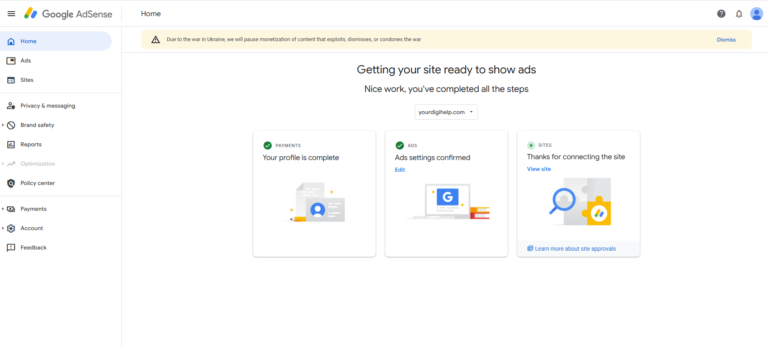
How to Get AdSense Approval Fast: My Proven Checklist
So you know what’s going wrong. Now here’s how to actually fix it and get approved on your next attempt. I’m not going to give you a fluffy “just write good content” answer. Here’s the real, actionable list.
Pre-Application Checklist
Content Requirements:
- Minimum 15–25 published posts with 800+ words each
- All content original, no duplicate content or paraphrased scraping
- At least 3–5 posts that are genuinely comprehensive (1,500+ words)
- Content is organized into clear categories with proper navigation
Essential Pages:
- About page with real information about you or your organization
- Contact page with working email or contact form
- Privacy Policy covering cookies and data collection (use a generator if needed)
- Terms of Service (especially for sites accepting comments)
Technical Health:
- HTTPS enabled across the entire site
- Mobile-friendly design (verify in Google Search Console)
- PageSpeed score of at least 60+ on mobile (80+ is ideal)
- No broken links or 404 errors
- XML sitemap submitted to Google Search Console
- No intrusive popups or aggressive interstitials
Traffic & Indexation:
- At least 50–100 daily visitors from organic/social sources
- Google has indexed your key pages (check via site:yourdomain.com in Google)
- Google Search Console set up and connected
- No manual actions or penalties in Search Console
Content Policy Compliance:
- No adult, hateful, violent, or prohibited content
- All images are properly licensed
- No health or financial misinformation
- Disclosure pages present for affiliate or sponsored content
Applying and Waiting
Once you’ve checked every box above, go ahead and apply. When you apply, Google will give you an ad code to place on your site do it. This is how they verify ownership and begin the review.
Don’t remove the code while waiting. Keep your site active and continue publishing during the review period.
If you’re rejected again, read the rejection email very carefully. Google does give you a reason, even if it’s vague. Match that reason to the checklist above and fix it before reapplying.
How to Get 100% AdSense Account Approval: The Mindset Shift
Here’s something nobody tells you, and it honestly changed how I approach AdSense applications for every client I work with.
Stop thinking about AdSense approval as the goal. Start thinking about building a site that’s genuinely worth advertising on.
I know that sounds like a motivational poster, but hear me out. Google’s entire review process is designed around one question: “Is this site providing real value to real users?” When you build your site with that question in mind real content, real trust signals, real user experience approval becomes a natural outcome rather than a gatekeeping battle.
The sites that get approved fastest aren’t the ones that game the system. They’re the ones that took 90 days to genuinely build something worth visiting.
What Happens After AdSense Approval
Once you’re approved, don’t immediately plaster ads everywhere. That’s actually one of the most common mistakes post-approval.
Follow these principles:
- Place ads where they naturally fit within the reading flow, not where they interrupt the experience
- Don’t click your own ads ever. Google’s systems are extremely sophisticated at detecting this.
- Don’t ask readers, friends, or social media followers to click your ads. That’s invalid traffic and can get your account suspended.
- Monitor your AdSense dashboard regularly for policy notifications
Google continuously reviews approved sites. Getting approved is the beginning, not the finish line.
FAQ: Everything You Need to Know About the AdSense Approval Process
How can I get Google AdSense approval fast?
The fastest path to AdSense approval is having 15+ quality posts, all essential site pages (About, Contact, Privacy Policy), a mobile-friendly HTTPS site, and at least some organic traffic. Don’t rush the process a site that’s been publishing for 2–3 months with consistent content will almost always get approved faster than a brand-new site scrambling to meet minimum requirements.
How long does AdSense take to approve a website in 2026?
Most sites receive a decision within 1–14 business days. The average is 3–7 days. Newer domains, sensitive niches, and sites with previous rejections tend to take longer. If two weeks have passed without a response, you can contact Google AdSense support through your dashboard.
What are the Google AdSense approval requirements?
Google’s official requirements include: original, valuable content; compliance with Google Publisher Policies (no prohibited content); proper site structure with essential pages; technical health including HTTPS; and no history of policy violations. There’s no officially stated minimum post count or traffic number, but real-world approval rates are much higher for sites with 15+ posts and some organic traffic.
Why does Google keep rejecting my AdSense application?
The most common reasons are: thin or copied content, missing pages (especially Privacy Policy), prohibited or restricted content, technical issues like no HTTPS or poor mobile experience, and applying too soon on a brand-new domain.
Can I apply for AdSense with a new website?
Technically yes — Google doesn’t state a minimum site age. But practically, a site under 3 months old with little content and no traffic is much more likely to be rejected. Most SEO professionals recommend waiting at least 3–6 months and building a solid content foundation first.
What is the Google AdSense approval process step by step?
You apply through your AdSense account, place the provided code on your site, then Google runs automated checks followed by human review. You’ll receive an email with either an approval or a rejection with a reason. If rejected, you can fix the issues and reapply — there’s no official limit to how many times you can apply.
Does Google AdSense require a minimum amount of traffic?
There’s no officially stated minimum traffic requirement. However, sites with zero organic traffic are much more likely to be rejected. In practice, having at least 50–100 daily visitors from legitimate sources (organic search, social media) significantly improves your approval odds.
What content is not allowed on AdSense sites?
Google prohibits ads on sites with adult/sexually explicit content, violent or hateful content, content promoting drugs or illegal activity, hacking/cracking tutorials, copyright-infringing content, health misinformation, deceptive claims, or content targeting children inappropriately. See the complete Google Publisher Policies for the full list.
Can I get AdSense approval for a WordPress blog?
Absolutely. WordPress is one of the most common platforms for AdSense publishers. Make sure your theme is fast, mobile-friendly, and supports HTTPS. Install an SEO plugin, set up Google Search Console, and follow the content and policy guidelines above.
How do I know if my site was rejected for content or technical reasons?
Google’s rejection emails will mention a specific reason most commonly “content” or “site navigation/technical issues.” Check the exact reason, then use Google Search Console and PageSpeed Insights to diagnose technical problems, or review your content against the Google Publisher Policies for content issues.
The YourDigiHelp Story: How a 1.5 Year Old Site Still Got Rejected (And Exactly Why)
Let me tell you something that might surprise you.
YourDigiHelp this very website had been live for over a year and a half before we applied for Google AdSense. Not a new blog. Not a weekend project. Eighteen months of publishing content, building an audience, and growing the site. And we still got rejected on our first application.
So if you’re sitting there thinking “but my site has been around for a while, surely that counts for something” yeah, we thought the same thing. Spoiler: site age alone means absolutely nothing if the fundamentals aren’t in place.
Here’s exactly what happened, what Google flagged, and what we did to fix it. No vague lessons — real specifics.
What Google Actually Flagged on YourDigiHelp
The rejection wasn’t mysterious. Google told us what was wrong. And when we read it carefully — it came down to two things that had nothing to do with our content quality, our traffic, or how long the site had been running.
Issue #1 — Missing Privacy Policy
YourDigiHelp had been running for 18 months without a properly structured Privacy Policy page. We had content. We had an About page. We had readers. What we didn’t have was a compliant Privacy Policy that disclosed how we handle cookies, user data, and third-party ad tracking.
Here’s why this is a hard stop for Google: AdSense itself uses cookies to serve personalized ads to your visitors. Google’s own publisher requirements state that any site running AdSense code must clearly disclose this to users. No Privacy Policy that covers this = instant rejection, full stop. Doesn’t matter if you’ve been publishing for 18 months or 18 days.
The fix sounds simple. And it is but only once you know it’s the problem. We created a proper, compliant Privacy Policy that explicitly covered third-party advertising cookies, data collection, and how users could manage their preferences. That’s what Google needs to see.
Issue #2 — Missing Terms and Conditions
Same situation. No Terms and Conditions page. Now, a lot of people debate whether T&C is truly required for AdSense and technically, Google doesn’t list it as a mandatory standalone requirement. But here’s what we know from direct experience: its absence signals that your site isn’t operating as a serious, professional web property. And that matters to reviewers.
A Terms and Conditions page tells Google (and your readers) that you’ve thought about how your site operates what content you publish, what users can and can’t do, what disclaimers apply. It’s a trust signal. Without it, your site looks unfinished, regardless of how much content is on it.
We added a clean, clear Terms and Conditions page specific to our content type. Done.
The Part That Stings Most We Could Have Avoided All of This
Here’s the honest truth that we share because you need to hear it: these were both entirely avoidable.
YourDigiHelp had been live for 18 months. In all that time building content, working on SEO, growing traffic we never stopped to add two pages that take a few hours to set up at most. Not because we didn’t know they existed. Because we assumed they were “optional extras” we could deal with later.
Later came in the form of a rejection email.
The lesson isn’t complicated. The legal and trust pages Privacy Policy, Terms and Conditions aren’t boring formalities to tick off someday. They’re foundational. Google treats them that way. You should too.
How We Fixed It and What We’re Doing Now
Our approach after the rejection was methodical, not panicked.
We didn’t scramble to reapply in 48 hours. We didn’t just generate a boilerplate Privacy Policy and slap it up. We did it properly:
Step 1: Created a comprehensive Privacy Policy covering cookies, AdSense ad serving, analytics data, and user rights customized to how YourDigiHelp actually operates, not a copy-paste job.
Step 2: Added a Terms and Conditions page tailored to our content site covering content ownership, user conduct, affiliate disclosure, and liability limitations.
Step 3: Audited every other page on the site for policy compliance before reapplying. If we’re going to fix it, we fix all of it.
Step 4: Waited. Let Google re-crawl the updated site. Kept publishing content in the meantime. No rushing.
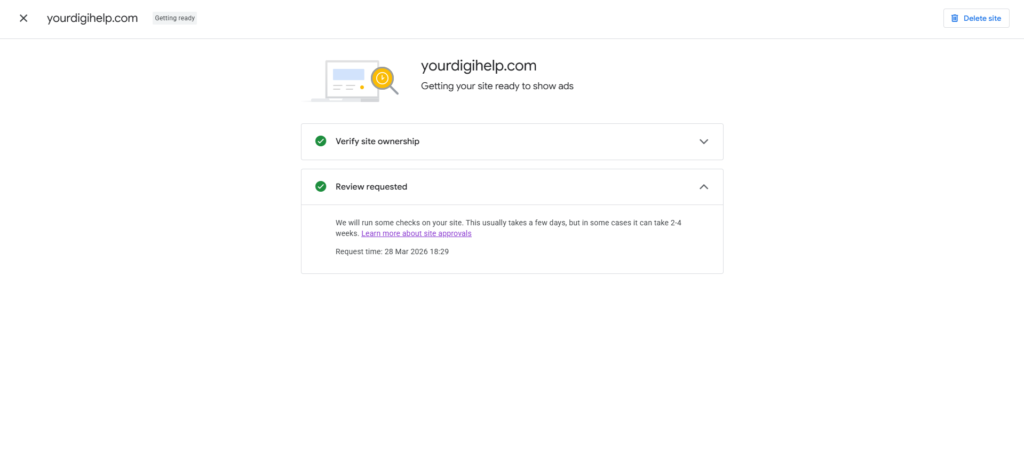
The result? Moving through the approval process with a site that now actually meets every requirement Google has for AdSense publishers.
What This Means for You
If you’re reading this as a site owner who’s been grinding away for months or even years and just got rejected, don’t assume the problem is your content or your traffic. Sometimes it’s the unglamorous, easy-to-overlook stuff that trips you up.
Check your Privacy Policy. Check your Terms and Conditions. Check them against what Google actually requires not just what looks good enough.
We ran this experiment so you don’t have to learn it the hard way. But if you already did welcome to the club. Now you know exactly what to fix.
There you have it. The full picture of why AdSense keeps rejecting you and a real, practical roadmap to finally getting that approval email.
The truth is, most people don’t fail AdSense because they’re doing something terrible. They fail because they’re impatient, or they skip one of the fundamentals thinking it won’t matter. It always matters.
Build the site right first. The approval will follow.
If you found this guide helpful and want more honest, no-fluff content about growing and monetizing your website, check out YourDigiHelp where we cover everything from AdSense and SEO to WordPress tips and digital marketing strategies, all from real experience, not textbooks.