
Multimodal Search in Google Search Console: What It Means for SEO
Google has started reporting on multimodal search inside Search Console. This is a real change in how site owners can measure and act on visual search traffic, and it opens up a new layer of optimization that most websites have never tracked before.
If you run a website, an online store, or an education platform, this update gives you a way to see exactly how people are finding your pages through cameras, screenshots, and uploaded photos, not just typed queries. Below is a full breakdown of what the feature does, why it matters for search, and how to build a content strategy around it.
What is multimodal search
Multimodal search refers to search queries that combine an image with text, voice, or no additional input at all. Instead of typing “red running shoes with white sole,” a user points their phone camera at a pair of shoes and asks Google what they are, or where to buy them.
Google now counts four sources under this category:
- Google Lens searches from a smartphone camera
- Circle to Search on Android devices
- Image uploads directly to Google Search
- The “Search this image” option in Chrome’s right click menu
All four of these send a visual signal to Google first, sometimes paired with a typed or spoken question. That is what separates multimodal search from a standard image search, where the query starts as text.
What changed in Search Console
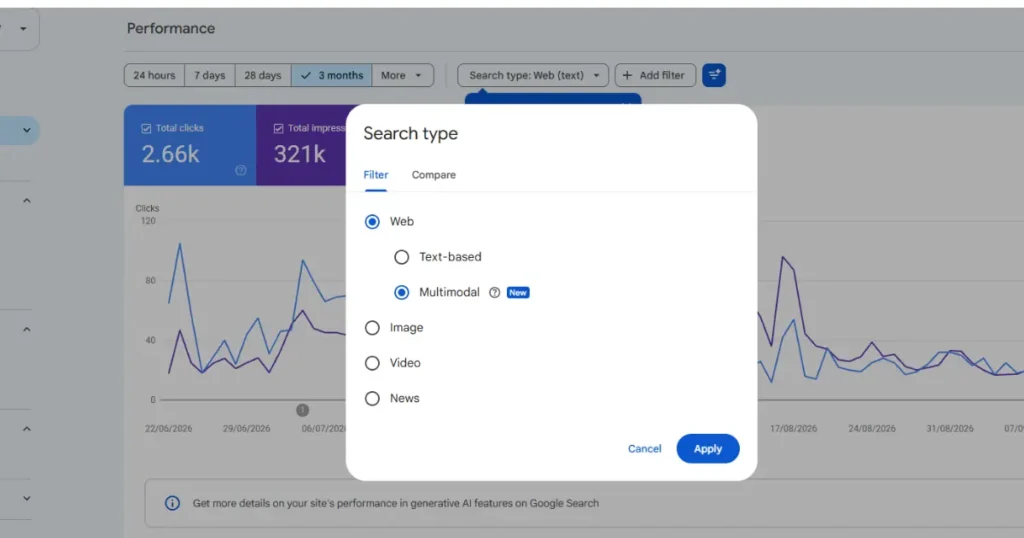
Starting September 24, 2026, Google added a multimodal filter to the Search results performance report and to the report for generative AI features in Search Console. Site owners can now isolate how many clicks, impressions, and average positions come specifically from multimodal queries, separate from regular text search.
To view this data, open the Performance report in Search Console, then apply the new search type filter and select multimodal. From there you can export the report and study it alongside your existing text and image search data.
This matters because before now, a site could receive meaningful traffic from Lens or Circle to Search and never know it. That traffic was folded into general search or image search numbers, with no way to separate it out. Site owners are finally able to answer the question: are people finding my content by pointing a camera at something, and if so, which pages benefit the most.
Why multimodal search is a big deal for SEO
Search behavior is shifting away from typing full sentences into a search bar. A growing share of queries now start with a photo, a screenshot, or a live camera view. Someone sees a plant they don’t recognize, a piece of furniture in a friend’s home, or a diagram in a textbook, and instead of guessing at keywords, they simply show Google the object.
For SEO, this changes what “ranking” means. A page can rank well for a typed keyword and still be invisible to a camera based search if its images are poorly labeled, low resolution, or disconnected from the surrounding text. Multimodal search rewards pages where the image and the text tell the same story clearly.
It also expands intent. A user searching by image is often closer to a decision than someone typing a broad keyword. Someone circling a product on their screen usually wants to buy it, identify it, or compare it right away. That makes multimodal traffic valuable even in smaller volumes.
How multimodal search actually works behind the scenes
When someone uses Lens, Circle to Search, or uploads an image, Google analyzes the visual content of the photo, matches it against indexed images and the pages they sit on, and then blends that with any typed or spoken text the user adds. The result draws on the same signals Google has always used for image indexing, filename, alt text, surrounding copy, structured data, and page context, but the entry point is visual instead of text first.
This is why optimizing for multimodal search is not a separate discipline from image SEO. It is an extension of it, with more weight placed on how accurately your images represent the actual product, place, or concept a camera might capture.
How to optimize your site for multimodal search
Use clear, high quality, real photos
Stock photos and heavily edited images make it harder for Google to match a real world camera capture to your page. Product shots taken from multiple angles, in natural lighting, with the product clearly isolated, perform better in visual matching than staged or filtered images.
Write descriptive file names and alt text
A file named IMG_2938.jpg gives Google nothing to work with. Renaming it to something like navy wool overcoat mens.jpg, and writing alt text that describes the item plainly, gives both the image indexing system and the multimodal matching system something concrete to compare against.
Keep image and surrounding text aligned
If a page shows a photo of a laptop but the paragraph next to it talks mainly about a bundled software offer, the image and the text pull in different directions. Multimodal matching works best when the visible object in the photo and the words around it describe the same thing, using the same terms a shopper or student would use.
Add structured data for products and educational content
Product schema, including price, availability, and brand, helps Google connect a photographed product to your specific listing rather than a competitor’s. For education sites, Course and LearningResource structured data help Google match a photographed textbook page, diagram, or worksheet to the right lesson page.
Build pages around objects, not just categories
A single page trying to cover an entire product category is harder to match against one photographed item than a dedicated page for that exact item. Granular pages, one product, one diagram, one specific topic, give multimodal search a cleaner target.
Compress images without losing detail
Large, slow loading images hurt both crawling and user experience, but over compressed images lose the fine detail that visual matching depends on. Balance file size with sharpness, particularly on product photography and diagrams.
Multimodal SEO for ecommerce brands
Shoppers already use their cameras constantly, screenshotting outfits, circling items in videos, and photographing products in physical stores to compare prices online. For ecommerce brands, this means:
- Every product image should be shot from the angles a customer might photograph in real life: front, side, close up on texture or material, and in use.
- Product titles and descriptions should include the plain language terms a shopper would use when identifying the item visually, such as color, pattern, material, and shape, not just the internal SKU name.
- Variant pages (different colors or sizes of the same product) need their own distinct images and alt text, so a photo of the blue version doesn’t get matched to your red version’s page.
- Merchant Center and Search Console should be checked together. If a product only appears in text search, but not in the multimodal filter, its image data likely needs work.
Multimodal SEO for ed tech and education brands
Students frequently photograph textbook pages, worksheets, whiteboards, and diagrams instead of typing out a question. Education platforms can capture this behavior by:
- Publishing standalone pages for individual diagrams, formulas, and worked examples, each with a clear, well labeled image.
- Using LearningResource and Quiz structured data so a photographed math problem or science diagram can be matched to a page that explains it step by step.
- Writing alt text and captions the way a student would describe what they see, such as labeled diagram of the water cycle stages, rather than a generic caption.
- Creating printable or textbook style versions of diagrams, since these tend to closely resemble what a student would actually photograph.
Step by step: reading your multimodal data in Search Console
- Open Search Console and go to the Performance report under Search results.
- Click the search type filter and select multimodal from the list.
- Review which queries, pages, and countries are generating multimodal clicks and impressions.
- Compare average position and click through rate for multimodal traffic against your text search numbers on the same pages.
- Export the data and cross reference it with your product or content catalog to find pages with strong multimodal impressions but weak clicks, since these usually need better images or clearer product matching.
- Repeat this review monthly, since visual search behavior and Google’s matching accuracy will keep evolving.
Common questions about multimodal search
A few examples of what a multimodal search looks like in practice: pointing a phone camera at a plant to identify its species, circling a jacket in a video call screenshot to find where to buy it, uploading a photo of a math problem to get an explanation, or right clicking an image in Chrome to find similar products.
This is a genuinely new feature, not a renamed version of image search. The multimodal filter tracks a distinct entry point, camera and image based queries, separately from typed image search and standard web search.
Any site with indexed images can appear in multimodal results, provided the images are crawlable, properly labeled, and connected to relevant text on the page. There is no separate submission process required beyond standard image and page indexing best practices.